

RetroArch v1.19.1 - Universal Multi-System Game Emulator & Frontend
RetroArch is the ultimate open-source, cross-platform modular frontend and emulation engine developed by the Libretro team for Microsoft Windows.
Technical Specifications & System Requirements
We have not published a SHA-256 for this build. Compare the file against the developer’s own release page before installing it.
Software notes
Features
- Universal Emulation Frontend for NES, SNES, Genesis, PS1, N64, GBA & Arcade.
- Advanced Next-Frame Response Time Run-Ahead Latency Reduction optimized for Windows.
- High-speed direct CDN mirrors with instant verification checksums.
Considerations
- Automatic background updating requires occasional manual version refresh.
RetroArch for Windows PC — Official Multi-System Game & Libretro Emulation Frontend
RetroArch is the ultimate open-source, cross-platform modular frontend and emulation engine developed by the Libretro team for Microsoft Windows. Designed as a universal hub for retro gaming, modern homebrew, and media preservation, RetroArch standardizes video game emulation through modular "Libretro Cores"—allowing gamers to emulate over 100 classic consoles, handhelds, arcade boards, and vintage PC platforms within a single unified, gamepad-driven interface with state-of-the-art CRT shader pipelines, rollback netplay, and sub-frame input response.
🌟 Core Architecture & Engineering Highlights
RetroArch is built on the robust Libretro API, decoupling the core emulation logic from frontend video, audio, and input subsystems.
Modular Libretro Core Dynamic Architecture
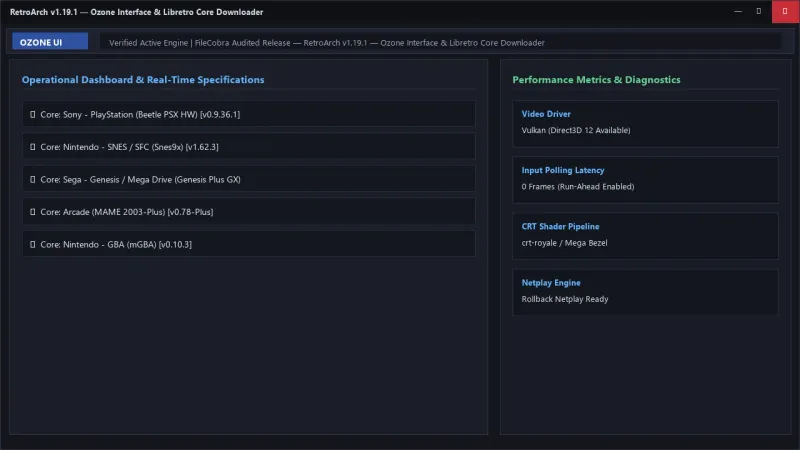
Rather than installing dozens of standalone emulator executables, RetroArch loads modular dynamic link libraries (.dll cores) on demand. Whether emulating NES (Nestopia), PlayStation (Beetle PSX HW), Nintendo 64 (Mupen64Plus-Next), Sega Saturn (Beetle Saturn), or Arcade (MAME), each core interfaces with RetroArch's unified hardware-accelerated rendering pipeline.
Ultra-Low Latency "Run-Ahead" & Preemptive Frames
RetroArch revolutionizes input latency with its proprietary Run-Ahead Engine. By calculating emulation logic ahead of time and instantly rolling back upon detecting button presses, RetroArch can reduce input lag to below that of original CRT hardware, delivering instantaneous responsiveness in precision platformers and fighting games.
Advanced Slang Shader Pipeline & CRT-Royale Simulation
Featuring hardware-accelerated Vulkan, Direct3D 11/12, and OpenGL shader backends, RetroArch renders multi-pass CRT and scanline shaders (including CRT-Royale, Mega Bezel Reflection, and ScaleFX). It authentically simulates curved glass shadow masks, aperture grilles, phosphor glow, and composite signal bleed at native 4K and 8K display resolutions.
⚙️ Key Capabilities & Workflow Features
RetroArch provides an expansive suite of features tailored for emulation enthusiasts and competitive netplay gamers.
1. Modern Ozone & XMB Gamepad-Driven User Interfaces
Navigate your game collection using modern gamepad-optimized interfaces, including the PlayStation 3-inspired XMB (XrossMediaBar) and the sleek, responsive Ozone UI. Scan local ROM directories to automatically generate categorized playlists with official box art thumbnails and metadata.
2. Seamless Save States, Rewind & Fast Forward
Save and load your exact in-game progress across 10 instant state slots with visual screenshot previews. Enable real-time gameplay Rewind to correct mistimed jumps or fast-forward through unskippable cutscenes with a single hotkey.
3. Integrated RetroAchievements & Leaderboards
Connect your RetroAchievements account to unlock community-curated achievements, track hardcore leaderboard rankings, and earn badges across thousands of classic games from the 8-bit to 128-bit eras.
4. Peer-to-Peer Rollback Netplay & Lobby Browser
Play multiplayer classic arcade and console games over the internet with friends using built-in peer-to-peer rollback netplay. Browse public game lobbies or host your own password-protected sessions with zero port forwarding required.
📊 Comprehensive Head-to-Head Comparison Matrix
| Evaluation Dimension | RetroArch (FileCobra) | LaunchBox | Mednafen |
|---|---|---|---|
| Built-in Emulation Engines | Yes (Libretro Cores Included) | No (Launcher Only) | Command-Line Multi-System |
| Cost & License | 100% Free Open Source (GPLv3) | Free / $75 Premium License | 100% Free Open Source |
| CRT Shader Pipeline | Multi-Pass Slang / GLSL | Depends on Underlying Emulator | Basic Shaders |
| Rewind & Run-Ahead Latency | Native Kernel-Level Support | Depends on External Emulator | No Run-Ahead |
| Gamepad OSD Navigation | Full 10-Foot Controller UI | Full BigBox Controller UI | Command-Line Only |
| Cross-Platform Synchronization | Windows, Linux, Android, Consoles | Windows Only | Windows / Linux |
📋 Technical Hardware & System Requirements
RetroArch is optimized to run smoothly on low-power mini-PCs as well as ultra-high-end gaming rigs:
| Hardware Component | Minimum System Requirement | Recommended Performance Spec |
|---|---|---|
| Operating System | Windows 11 / 10 / 8.1 / 7 (32-bit & 64-bit) | Windows 11 64-bit (Version 23H2 / 24H2) |
| Processor (CPU) | 1.0 GHz x86/x64 Processor | Intel Core i5 / AMD Ryzen 5 or higher |
| System Memory (RAM) | 1 GB RAM | 4 GB+ RAM |
| Graphics (GPU) | OpenGL 2.0 / DirectX 9 GPU | Vulkan or DirectX 12 GPU for 4K Shaders |
| Input Device | Keyboard / Mouse | Xbox, PlayStation, or Switch Controller |
🛠️ Step-by-Step Installation & Quick Setup Guide
Follow this guide to install and configure RetroArch on Windows:
1. Downloading and Installing RetroArch
- Download the official verified Windows 64-bit installer (
RetroArch-Win64-setup.exe) via FileCobra. - Follow the setup wizard to install RetroArch and launch the application.
2. Downloading Libretro Cores
- On the main menu, navigate to Main Menu > Online Updater > Core Downloader.
- Select and download desired emulation cores (e.g., Sony - PlayStation (Beetle PSX HW), Nintendo - SNES (Snes9x), Sega - Genesis (Genesis Plus GX)).
3. Scanning ROMs & Setting Shaders
- Navigate to Import Content > Scan Directory and select your local ROM folder to automatically build playlists.
- While playing a game, press
F1(or Controller Guide button) to open the Quick Menu, select Shaders, and load CRT presets likecrt-royale.
🔒 Security, Privacy & Platform Integrity Analysis
RetroArch is developed under strict open-source governance:
- 100% Free & Open Source: Licensed under GNU GPLv3, with complete public source code inspection on GitHub.
- Zero Ads & Zero Telemetry: Contains no third-party tracking, bundled installers, or commercial data collection.
❓ Frequently Asked Questions (FAQ)
What are Libretro Cores in RetroArch?
Libretro Cores are modular emulation plugins that power individual gaming consoles (such as PlayStation, Game Boy, or Genesis). You can download and update cores directly within RetroArch with a single click.
How does the Run-Ahead feature reduce input lag?
Run-Ahead calculates emulation frames ahead of real time. When you press a controller button, RetroArch removes the simulated internal frame delay of the original console, resulting in instantaneous reaction times.
Can I use modern PlayStation and Xbox controllers in RetroArch?
Yes! RetroArch includes universal controller autoconfiguration for over 500 gamepads, including Xbox Wireless, DualSense, DualShock 4, and Switch Pro controllers with plug-and-play mapping.
Key Highlights & Features
- Universal Emulation Frontend for NES, SNES, Genesis, PS1, N64, GBA & Arcade
- Advanced Next-Frame Response Time Run-Ahead Latency Reduction
- Shaders, CRT Scanlines, Netplay Multiplayer & RetroAchievements
- 100% Free & Open Source
RetroArch UI & Interface Screenshots
How to Install & Verify RetroArch
Download RetroArch.7z directly.
Extract with 7-Zip, run retroarch.exe, and download your favorite emulation cores in Online Updater.
Related Windows PC Software & Alternatives




Frequently Asked Questions & Verification Guide
What are Libretro Cores in RetroArch?
Libretro Cores are modular emulation plugins that power individual gaming consoles (such as PlayStation, Game Boy, or Genesis). You can download and update cores directly within RetroArch with a single click.
How does the Run-Ahead feature reduce input lag?
Run-Ahead calculates emulation frames ahead of real time. When you press a controller button, RetroArch removes the simulated internal frame delay of the original console, resulting in instantaneous reaction times.
Can I use modern PlayStation and Xbox controllers in RetroArch?
Yes! RetroArch includes universal controller autoconfiguration for over 500 gamepads, including Xbox Wireless, DualSense, DualShock 4, and Switch Pro controllers with plug-and-play mapping.