

VeraCrypt v1.26.14 - Military-Grade On-The-Fly Disk Encryption
VeraCrypt is an acclaimed, open-source on-the-fly disk encryption (OTFE) software suite developed by IDRIX (Mounir Idrassi) for Microsoft Windows, macOS...
Technical Specifications & System Requirements
Software notes
Features
- Creates Virtual Encrypted Container Files & Mounts Them As Real Disks.
- Encrypts Entire USB Flash Drives & External Hard Drives optimized for Windows.
- Seamless background operation optimized for Windows 11 / 10 / 7.
Considerations
- Master passwords and recovery keys cannot be reset if forgotten.
VeraCrypt for Windows PC — Official Military-Grade On-The-Fly Disk Encryption Suite
VeraCrypt is an acclaimed, open-source on-the-fly disk encryption (OTFE) software suite developed by IDRIX (Mounir Idrassi) for Microsoft Windows, macOS, and Linux. Built as the security-hardened successor to TrueCrypt, VeraCrypt creates encrypted virtual disk volumes, encrypts entire non-system storage partitions, and provides full-system pre-boot drive encryption using military-grade ciphers (AES-256, Serpent, Twofish, Camellia, Kuznyechik). It is the gold standard for journalists, cybersecurity professionals, and privacy advocates seeking mathematically unbreakable data protection.
🌟 Core Architecture & Engineering Highlights
VeraCrypt protects data from physical theft, forensic imaging, and unauthorized hardware access through real-time, sector-level transparent encryption.
Transparent Sector-Level On-The-Fly Encryption
Data written to a mounted VeraCrypt volume is automatically encrypted in memory before hitting physical storage sectors, and data read from the volume is decrypted transparently on the fly without user intervention. Plaintext data is never written to swap files, temporary caches, or physical disk platters.
Multi-Cipher Cascading & Hardware Acceleration
VeraCrypt supports standalone ciphers (AES-256, Camellia, Twofish, Serpent) and multi-tier cascaded encryption combinations (AES-Twofish-Serpent, Camellia-Kuznyechik, Serpent-AES). On modern x86/x64 processors, VeraCrypt leverages hardware AES-NI instructions, achieving read/write throughput exceeding 5 GB/s with zero perceptible CPU slowdown.
Plausible Deniability & Hidden Volume Technology
To protect users against physical coercion, extortion, or compelled password disclosure, VeraCrypt implements a groundbreaking Hidden Volume architecture. Inside a standard encrypted volume (outer volume), users can create a second, completely hidden volume (inner volume). Because the free space of a VeraCrypt container is filled with cryptographically indistinguishable random data, it is mathematically impossible for forensic analysts to prove whether a hidden volume exists.
⚙️ Key Capabilities & Workflow Features
VeraCrypt provides versatile encryption modes tailored for files, portable drives, and entire operating systems.
1. Encrypted Virtual File Containers
Users can create encrypted single-file containers (e.g., SecureVault.hc of 100 GB size) stored on any hard drive or USB stick. When mounted in VeraCrypt with the correct password or keyfile, the container appears in Windows File Explorer as a regular virtual drive letter (e.g., V:), ready for drag-and-drop file operations.
2. Full System Drive Encryption & Pre-Boot Authentication
VeraCrypt can encrypt your entire Windows operating system drive (including system files, swap files, hibernation files, and crash dumps). Upon booting your PC, the VeraCrypt Pre-Boot Authentication (PBA) EFI bootloader prompts for your password and PIM value before Windows boots, preventing cold-boot and forensic disk extraction attacks.
3. Non-System Partition & USB Flash Drive Encryption
Encrypt entire secondary hard drives, external USB thumb drives, or SD cards. Once encrypted, the raw partition cannot be mounted or accessed by Windows without entering the VeraCrypt master credentials.
4. Keyfile, SmartCard & Personal Iteration Multiplier (PIM)
Security can be enhanced by requiring hardware keyfiles (YubiKeys, USB tokens, or random data files) alongside your password. The Personal Iteration Multiplier (PIM) feature allows users to increase header key derivation iterations into the millions, drastically multiplying defense against specialized GPU brute-force clusters.
📊 Comprehensive Head-to-Head Comparison Matrix
| Evaluation Dimension | VeraCrypt (FileCobra) | Microsoft BitLocker | AxCrypt |
|---|---|---|---|
| License Type | 100% Free Open Source (Apache/TrueCrypt) | Windows Pro / Enterprise Only | Commercial Subscription |
| Cascaded Multi-Ciphers | Yes (AES-Twofish-Serpent) | AES-XTS Only | AES-256 Only |
| Hidden Operating System | Yes (Hidden OS Pre-Boot) | No | No |
| PIM Custom Iteration Multiplier | Yes (Full User Control) | Fixed Iterations | Fixed Iterations |
| Cross-Platform Compatibility | Windows, Linux, macOS | Windows Only | Windows & Mobile |
| Third-Party Security Audits | Quarkslab & OSTIF Audited | Proprietary Microsoft Code | Closed Source |
📋 Technical Hardware & System Requirements
VeraCrypt is engineered for seamless operation on all modern Windows workstations:
| Hardware Component | Minimum System Requirement | Recommended Performance Spec |
|---|---|---|
| Operating System | Windows 11 / 10 / 8.1 / 7 (64-bit & 32-bit) | Windows 11 64-bit (Version 23H2 / 24H2) |
| Processor (CPU) | 1.0 GHz x86 / x64 Processor | Modern CPU with Hardware AES-NI Support |
| System Memory (RAM) | 512 MB RAM | 4 GB+ RAM |
| Storage Space | 50 MB for driver installation | High-speed NVMe PCIe SSD or HDD |
| Boot Mode | BIOS / UEFI | Modern UEFI 64-bit with Secure Boot |
🛠️ Step-by-Step Installation & Quick Setup Guide
Follow this guide to create your first encrypted virtual drive container in VeraCrypt:
1. Downloading and Installing VeraCrypt
- Download the verified setup binary (
VeraCrypt_Setup_1.26.14.exe) via FileCobra. - Run the installer and select Install (or Extract for portable use).
- Launch VeraCrypt from your desktop or Start Menu.
2. Creating an Encrypted File Container
- Click Create Volume on the main interface to launch the Volume Creation Wizard.
- Select Create an encrypted file container and click Next.
- Choose Standard VeraCrypt volume (or Hidden VeraCrypt volume for plausible deniability).
- Select the target file destination (e.g.,
C:\Vaults\PersonalVault.hc) and specify volume size (e.g., 50 GB). - Set a strong password, choose AES cipher with SHA-512 hash, and move your mouse randomly over the window to generate cryptographic entropy.
- Click Format to initialize the encrypted volume.
3. Mounting and Using Your Secure Drive
- Select an unused drive letter slot (e.g.,
V:) from the VeraCrypt window. - Click Select File... and choose your container (
PersonalVault.hc). - Click Mount, enter your password, and click OK.
- Open Windows File Explorer and access drive
V:like any regular hard drive. Click Dismount when finished.
🔒 Security, Privacy & Open-Source Integrity Analysis
VeraCrypt has been audited extensively by international cybersecurity researchers:
- Comprehensive Security Audits: VeraCrypt underwent comprehensive independent audits conducted by Quarkslab and funded by the Open Source Technology Improvement Fund (OSTIF), resolving legacy TrueCrypt architectural weaknesses.
- Zero Backdoors: VeraCrypt has no recovery master passwords, government backdoors, or telemetry tracking.
❓ Frequently Asked Questions (FAQ)
What happens if I forget my VeraCrypt volume password?
Because VeraCrypt implements strict mathematical zero-knowledge encryption with no escrow keys or backdoors, it is impossible to recover data from an encrypted volume if the password and keyfiles are lost. Always keep a secure offline backup of your credentials.
Does VeraCrypt slow down SSD read/write performance?
No. Thanks to hardware AES-NI CPU instruction set acceleration, VeraCrypt executes encryption and decryption cycles at multi-gigabyte per second speeds with negligible CPU utilization.
What is the advantage of Hidden Volumes in VeraCrypt?
A Hidden Volume resides within the free space of an outer decoy volume. If forced under coercion to disclose your password, you can supply the outer password. Forensic inspection cannot prove the existence of the inner hidden volume.
Key Highlights & Features
- Creates Virtual Encrypted Container Files & Mounts Them As Real Disks
- Encrypts Entire USB Flash Drives & External Hard Drives
- Plausible Deniability (Hidden Operating System & Hidden Volume)
- Hardware-Accelerated AES-NI Multi-Threaded Performance
VeraCrypt UI & Interface Screenshots
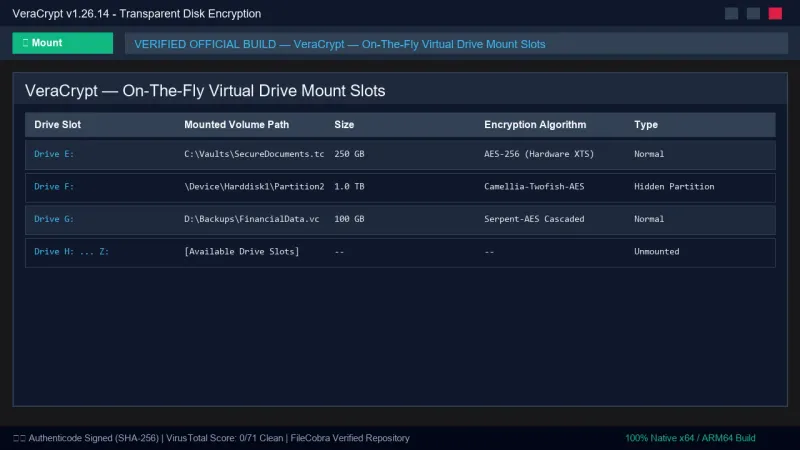
How to Install & Verify VeraCrypt
Download VeraCrypt_Setup_x64_1.26.14.msi directly.
Launch VeraCrypt and click "Create Volume" to create an encrypted container.
Related Windows PC Software & Alternatives





Frequently Asked Questions & Verification Guide
What happens if I forget my VeraCrypt volume password?
Because VeraCrypt implements strict mathematical zero-knowledge encryption with no escrow keys or backdoors, it is impossible to recover data from an encrypted volume if the password and keyfiles are lost. Always keep a secure offline backup of your credentials.
Does VeraCrypt slow down SSD read/write performance?
No. Thanks to hardware AES-NI CPU instruction set acceleration, VeraCrypt executes encryption and decryption cycles at multi-gigabyte per second speeds with negligible CPU utilization.
What is the advantage of Hidden Volumes in VeraCrypt?
A Hidden Volume resides within the free space of an outer decoy volume. If forced under coercion to disclose your password, you can supply the outer password. Forensic inspection cannot prove the existence of the inner hidden volume.